
Events
Description
A mechanism for communication between objects.
Used in building loosely coupled applications and extending applications
When you create a class for example that encodes a video and then after the video is encoded it needs to send a message to the owner of the video.
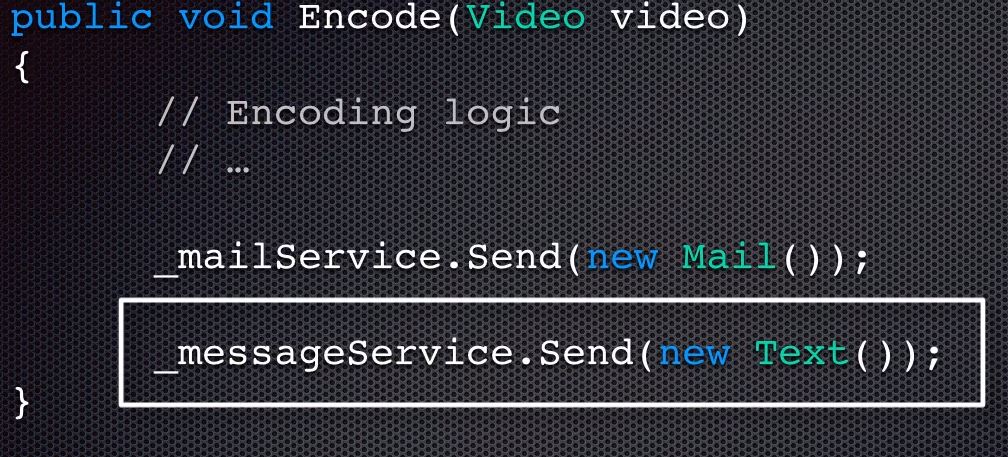
When we want to add additional notification in the future, we have to add another line of code to send a text message.
This means that the class and all classes depending on it must be re-compiled.
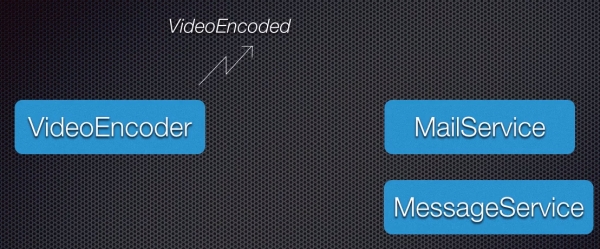
We can have our VideoEncoder method publish a event called VideoEncoded and have the MailService class subscribe to the event.
VideoEncoder knows nothing about MailService, and in future if we want to extent our notification, we can simply add a new class called MessageService and have MessageService subscribe to the VideoEncoded event.
The VideoEncoder class do not have to be re-compile if we add more notification services.
For VideoEncoder to send a message to his subscribers, it needs to invoke a method in the subscriber.
Both the publisher and subscriber need to agree on a method with a specific signature (contract), often called Event Handlers
//method called by the publisher when the event is raised.
//thus, we need to have a method like this in the MailService and MessageService class.
public void OnVideoEncoded (object source, EventArgs e)
{ }
How do we tell VideoEncoder what method to call?
With Delegates.
- Agreement / Contract between Publisher and Subscriber.
- Determines the signature of the event handler method in Subscriber.
Publish Event
To give a class the ability to publish an event there are 3 steps to follow:
1. Define a delegate (contract or signature between publisher and Subscriber).
2. Define an event based on the delegate defined.
3. Raise (publish) the event.
//1. Define a delegate (contract or signature between publisher and Subscriber)
public delegate void VideoEncodedEventHandler(object source, EventArgs args);
//EventArgs include any additional data about the event.
//This delegate holds a reference to a function that looks like: void ... (object .., EventArgs ..)

//2. Define an event based on the delegate defined
public event VideoEncodeEventHandler VideoEncoded;

//3. Raise (publish) the event
//To raise an event we need a method that is responsible for that
//.NET convention suggest that your event publisher methods be protected virtual void and in terms of naming start with the word On and then the name of the event.
protected virtual void OnVideoEncoded()
{
    if (VideoEncoded != null)
        VideoEncoded(this, EventArgs.Empty);
}
//This method must be called whenever the event need to be raised, in this case when a video is encoded.
.....encoding video code
OnVideoEncoded();
Creating Subscribers
public class MailService
{
    public void OnVideoEncoded(object source, EventArgs e)
    {
        ...sending an email
    }
}
public class MessageService
{
    public void OnVideoEncoded(object source, EventArgs e)
    {
        ...sending a text
    }
}
//Next we have to subscribe the MailService and MessageService to the VideoEncoded event of the VideoEncoder
var video = new Video() { Title = "Video 1"};
var videoEncoder = new VideoEncoder(); //publisher
var mailService = new MailService(); //subscriber
var messageService = new MessageService(); //subscriber

//subscribe the subscriber to the VideoEncoded event
videoEncoder.VideoEncoded += mailService.OnVideoEncoded;
videoEncoder.VideoEncoded += messageService.OnVideoEncoded;

videoEncoder.Encode(video);
Supplying EventArgs
//1. First create a custom class that derive from EventArgs
public class VideoEventArgs : EventArgs
{
    public Video Video {get; set;}
}
//Now we can change our arguments in our delegate
public delegate void VideoEncodedEventHandler(object source, VideoEventArgs args);
//You also have to modify your Event Handler
protected virtual void OnVideoEncoded(Video video)
{
    if (VideoEncoded != null)
        VideoEncoded(this, new VideoEventArgs() { Video = video});
}
//You also have to modify the methods in your subscribers to comply with the delegate
public class MailService
{
    public void OnVideoEncoded(object source, VideoEventArgs e)
    {
        Console.Writeline("Sending an email" + e.Video.Title);
    }
}
//Make the same change in MessageService
Using .NET Event Handler
//EventHandler
//EventHandler<TEventArgs>
//You can use these delegates instead of creating your own
//Update event based on the .NET generic event handler
public event EventHandler VideoEncoded; //Sending no additional arguments
public event EventHandler<VideoEventArgs> VideoEncoded; //Sending additional arguments
//You can remove the custom delegate: public delegate void VideoEncodedEventHandler(object source, EventArgs args);