
Tag Helpers
- Tag Helpers enable server-side code to participate in creating and rendering HTML elements in Razor files.
- Tag Helpers are very focussed around the html elements and much more natural to use.
- The main difference between Tag Helpers and Angular Directives is that Tag Helpers are for server side rendering where Angular Directives are about client side rendering.
- Html Helpers is methods throughout your Razor mark-up.
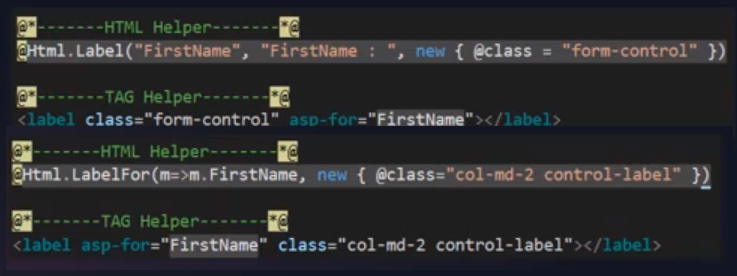
- Tag Helpers is much more user friendly than Html Helpers as seen below:
| asp-action | Define the action: asp-action="Index" |
| asp-append-version | |
| asp-area | Define the area: asp-controller="Admin" |
| asp-controller | Define the controller: asp-controller="Category" |
| asp-for | Link the element value to the model value |
| asp-page |
Redirest to a razor page. asp-page="/Index" |
| asp-route- |
After the last - you add the name of the id you want to pass. asp-route-Id="@Model" This could be used to create a partial view of Edit, Details and Delete buttons in a table. You can create a model which only accepts an integer (@model int) |
| asp-validation-for |
Used in conjuction with asp-validation-summary. Specify the value of the model that is being validated. <span asp-validation-for="Name" class="text-danger"></span> |
| asp-validation-summary |
Display a summery of validations defined in the model <div asp-validation-summary="ModelOnly" class="text-danger"></div> |
| <partial name="NameOfView" /> |
Insert a partial view. If you have to add a value to the partial view use the following: <partial name="NameOfView" model="item.Id" /> |
Html Helpers
- There is some cases where there is no corresponding Tag Helper for some Html Helpers.
- It is perfectly fine to use a combination of Tag and Html Helpers in your razor pages.
| @Html.DisplayFor (m=> m.Name) | Displays the value Name from the model currently attached to your view |
| @Html.DisplayNameFor (m=> m.Name) | Displays the value Name from the model currently attached to your view |