
General
Meta Package
- Microsoft.AspNetCore.App was the metapackage which contained all features of .NET Core.
- Prior to .NET Core 3, metapackage was included as a NuGet package.
- With .NET Core 2 onwards, meta package is a part of .NET core installation itself, so you do not have to include that in the project reference anymore.
Files & Folders
.csproj
- Double click on Project Name to open file.
- Displays the current target .NET Framework and installed installed NuGet packages.
launchSettings.json
- This file is under Properties.
- This file tells Visual Studio what to do when you press the Run (F5) button.
- Include profiles and settings like IIS Express that will load project into a browser.
- It will also set the environment variables to the applicable environment (Development, Production ect).
- This environment variable can be used inside our project to load applicable files for the different environments, for example load full css files for development and minified versions for production.
- The profiles can also be set, by clicking on Project Properties > Debug and selecting a profile from the 'Profile' dropdown.
- Here you can also add additional environment variables, other than the current enviroment.
- You will also see your profiles in the Run dropdown.
wwwroot
- Contains all your project static files like css, javascript, static html and libraries.
- This will be the root folder for our website.
- No code files (C# or razor) should be placed here.
- Bootstrap, jQuery and jQuery validations will be added by default.
_ViewImports.cshtml
- In this partial view you can specify what Tag Helpers you want to use in your project with the @addTagHelper directive.
- You can also add custom tag helpers, when you create your own tag helpers and want to register them for this application.
- This definition is on a global level. You can define tag helpers on individual page level as well.
_ViewStart.cshtml
- This partial view will define the master page that we will use for our application.
Routing
- Routing in ASP.NET maps URL's to physical files on disk.
- Razor pages needs a root folder.
Tag Helpers
- Tag Helpers enable server-side code to participate in creating and rendering HTML elements in Razor files.
- Tag Helpers are very focussed around the html elements and much more natural to use.
- The main difference between Tag Helpers and Angular Directives is that Tag Helpers are for server side rendering where Angular Directives are about client side rendering.
- Html Helpers is methods throughout your Razor mark-up.
Action Result
- ActionResult is a result of action methods or return types of action methods.
- Action result is a parent class for many of the derived classes that have associated helpers.
- The IActionResult return type is appropriate when multiple ActionResult return types are possible in an action.
Main Method
- No global.asax anymore.
- Startup is defined by you with the Program.cs class file and the Main method within.
- Application initially starts as a command line application and the Main method configures ASP.NET Core and starts it.
- The 'webBuilder.UseStartup();' indicates the startup class file to use.
Startup Class
- The Startup.cs class is a simple class not deriving from any other class.
- By convention 2 methods will be called during the startup process : ConfigureServices and Configure.
ConfigureServices Method
- ConfigureServices configures dependency injection and adds services to the application.
- Dependency injection forms an integral part of ASP.NET Core.
- The IServiceCollection object provides a list of available services like:
  - Entity Framework Core
  - Identity
  - MVC
Configure Method
- The Configure Method configures the http request pipeline.
- The pipeline defines how the application should respond to http requests.
- The pipeline is composed of individual parts called middleware.
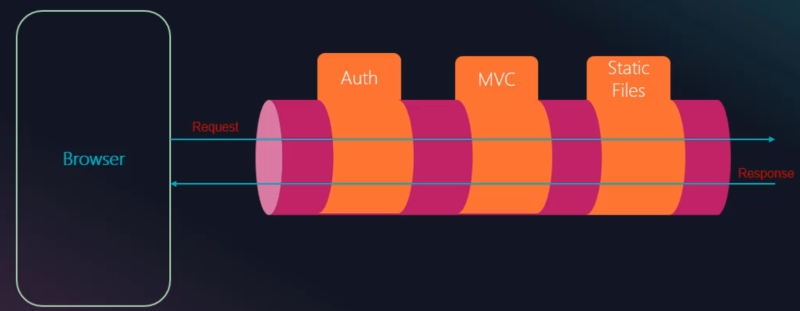
- You can add Auth, MVC and Static Files as middleware to mention a few.
- The order that you specify your middleware is very important, as you do not want to load MVC if your user is not authenticated.
- We also configure a middleware for Static Files like html, css, images or javascript files.
- The data (request) travel through the pipeline and gets manipulated by the different middleware, and do does the result (response).
Middleware
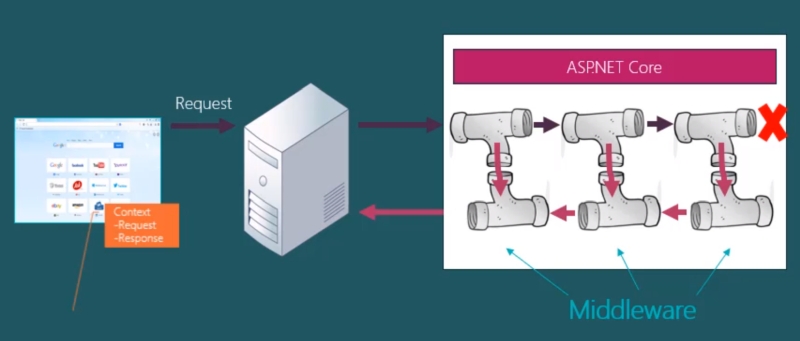
- Middleware is software components that is used to handle http requests and responses.
- When Server receives a Request, the server accesses the .NET Core Framework and attached the request to a Context Object.
- The Context Object is passed along the pipeline and interpreted by each set of the middleware (pipeline).
- Each set of middleware will determine if a response is needed and if not (if applicable) will sent the Context Object to the next piece of middleware.
- The Context Object will be passed along the pipeline until it reaches the last pipeline (middleware) (that is if there was not response needed earlier in the pipeline).
- If the Context reach the end of the pipelina and still no Response is found a 404 Not Found message will be returned.
- Typically your Context will go through the entire pipeline and the last piece of middleware will sent back a response.
- The order of the pipeline is important, as the Context Object is always passed from the first to the last in that order.
appsettings.json
- Contains all the application settings.
- Any changes to the application.json file will require restarting the "Microsoft IIS Administration" service to take effect.
- This is where you will add setting like your connection string or API URL ect.
Routing
- Inside your Startup.cs class file in the 'Configure' method you define the routing middleware and endpoints.
- Endpoint routing has been introduced with .NET Core 3 and lets you define more than 1 routing pattern.

    app.UseRouting();
    app.UseEndpoints(endpoints =>
    {
        endpoints.MapControllerRoute(
            name: "default",
            pattern: "{controller=Home}/{action=Index}/{id?}");
        endpoints.MapRazorPages();
    });
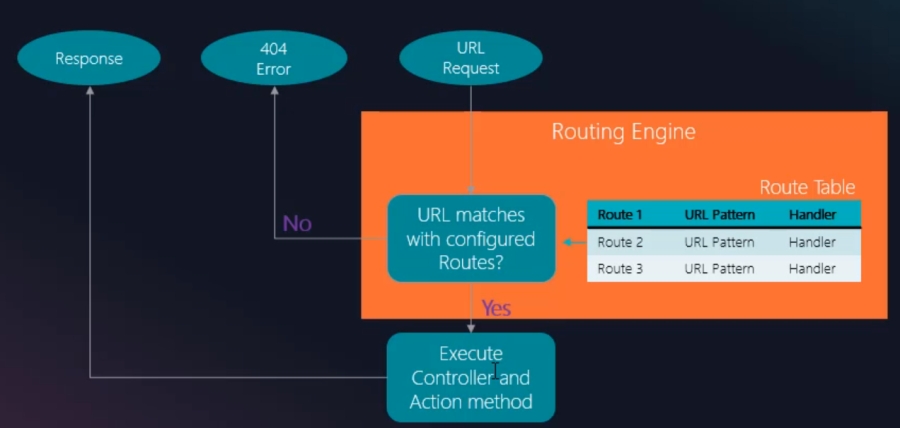
- Routing defines that based on the url that we type what page should be fetched.
- ASP.NET Routing is a pattern match algoritme that enables you to match the incoming request to a particular MVC Action defined in a Controller.
- When the Routing engine receives a request at runtime, it finds a match against the requested URL against the URL pattern define in the Route Table.
- If a match is found, it forward the request to the controller, otherwise it returns a 404 Not Found Error.
Add Areas
- Add new folder called 'Areas'.
- Add new area 'YourAreaName' to your project.
- Delete file 'ScaffoldingReadMe.txt'.
- Remove folders Data and Models underneath the area.
Controller linked to Area
- Create controller in your area..
- You have to specify inside the controller what area the controller belongs to.
- Add [Area("YourAreaName")] above 'public class YourController : Controller' in your controller
Update Routing in Startup.cs
- Update routing in your StartUp.cs file:
pattern: "{area=YourAreaName}/{controller=Home}/{action=Index}/{id}"
Copy _ViewImports.cshtml & _ViewStart.cshtml files
Copy the _ViewImports.cshtml & _ViewStart.cshtml files to the Views folder of your 'Identity 'area. to be able to use tag helpers and the _Layout.cshtml template page
Update the _ViewStart.cshtml Layout to Layout = "~/Views/Shared/_Layout.cshtml";
View Model
- A View Model is a collection of Models or Entities for a specific View.
- Create a 'ViewModels' folder inside the 'Models' folder for your view models.
- View Models can also contain properties that is not in a model, like a StatusMessage string or a generic list.